Account Sharing in SaaS: The Security Risk Nobody Talks About

Mari Dimasi
Content & Growth
 Claude
  Perplexity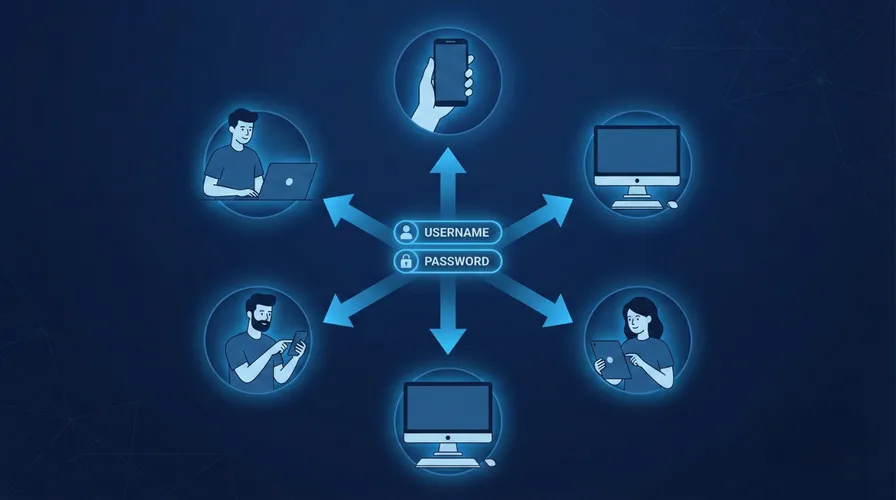
In 2023, Netflix estimated it was losing $9.1-12.5 billion annually to password sharing. Over 100 million households were using shared credentials to access the service without paying. When Netflix cracked down with device-based verification and paid sharing tiers, they added 13 million subscribers in a single quarter.
Enterprise SaaS has the same problem. The difference is that when a Netflix password is shared, the company loses subscription revenue. When an enterprise SaaS password is shared, the company loses control over who is accessing its data, its systems, and its customer information.
One in three employees admits to sharing work passwords. 67% of employees at Fortune 1000 companies use unapproved SaaS apps, often sharing credentials to avoid per-seat licensing costs. And when one of those shared credentials is compromised, the organization discovers it has no idea who actually had access.
Why employees share accounts
Account sharing in enterprise SaaS is rarely malicious. It is usually practical, which is what makes it so widespread.
Cost avoidance
Per-seat SaaS pricing creates a direct incentive to share accounts. A team of 10 that needs access to an analytics tool priced at $50/seat/month saves $4,500 per year by sharing two accounts instead of buying ten. Employees see this as resourceful, not risky. Finance teams sometimes encourage it.
Convenience
When a colleague needs quick access to a tool, sharing credentials is faster than submitting an IT request, waiting for approval, and configuring a new account. In fast-moving environments (startups, agencies, project-based teams), informal credential sharing becomes the default workflow.
Role gaps
Many SaaS applications do not offer granular role-based access. If a junior employee needs to view one report in an admin-level tool, the path of least resistance is borrowing an admin’s credentials for five minutes. Those five minutes often become permanent access.
Contractor and vendor access
External contractors frequently need temporary access to internal tools. Rather than provisioning (and later deprovisioning) individual accounts, teams share a single set of credentials. The contractor works for three months, the project ends, and the shared credentials remain active indefinitely.
The security risks of shared accounts
Every shared credential multiplies the attack surface and eliminates accountability.
Broken audit trails
When three people share one account, every action in the audit log is attributed to the same user. If sensitive data is exported, a configuration is changed, or a record is deleted, the organization cannot determine which of the three people was responsible.
This is not a hypothetical problem. Insider threat investigations regularly hit dead ends because shared accounts make attribution impossible. It takes an average of 81 days to detect and contain an insider threat incident. Shared accounts extend that timeline because the anomalous behavior is spread across multiple individuals, diluting the signals that detection systems rely on.
Expanded attack surface
Every person who knows a shared credential is a phishing target. If three people share an account and one of them falls for a phishing email, the attacker gets access to the shared account. The organization may never know which of the three was compromised.
Infostealer malware on any device with the shared credentials stored harvests them. The 1.8 billion credentials stolen by infostealers in 2025 include shared credentials that are stored in browser password managers across multiple devices.
MFA bypass
When credentials are shared, MFA becomes either shared (the group passes around TOTP codes) or disabled (because managing MFA for a shared account is impractical). Either approach defeats the purpose of multi-factor authentication.
Push-based MFA is particularly problematic for shared accounts. If the MFA approval goes to one person’s phone but another person is trying to log in, the account owner may approve the push without knowing who triggered it.
Compliance violations
SOC 2, HIPAA, GDPR, and PCI DSS all require individual accountability for access to sensitive systems. Shared accounts violate this requirement by design. During a compliance audit, the inability to demonstrate individual access attribution is a finding that can result in failed certifications, regulatory penalties, and contract violations with customers who require SOC 2 compliance.
License audit exposure
SaaS vendors increasingly audit usage to detect shared accounts. When discovered, the organization faces back-billing for the actual number of users, contract penalties, and potential service termination. The cost savings from sharing accounts often end up costing more than the licenses would have.
How to detect account sharing
The Netflix playbook applies directly to enterprise SaaS: use device signals to identify when usage patterns do not match a single user.
Device count anomalies
A typical employee accesses SaaS applications from 2-3 devices: a work laptop, a personal phone, and occasionally a tablet or home desktop. An account accessed from 8 different devices in a week is not one person. It is a shared account.
Device fingerprinting makes this detection straightforward. Each device and browser combination produces a visitorId tied to hardware characteristics. Counting distinct visitorId values per account over a rolling window reveals sharing patterns. Note that a single user legitimately accumulates a few identifiers over time (work laptop, personal phone, plus new values after major browser updates), so thresholds should account for this. An account with 3-4 identifiers is normal. An account with 8 or more in a short window is not.
Impossible travel
If an account logs in from a device in New York at 9 a.m. and from a different device in London at 9:15 a.m., the account is shared. No one travels 3,500 miles in 15 minutes. Combining device fingerprinting with IP geolocation makes impossible-travel detection more reliable than IP-only approaches.
Concurrent sessions from different devices
A single user can have sessions on a laptop and a phone simultaneously. That is normal. A single user with concurrent active sessions on three laptops and two desktops is sharing credentials. Monitoring concurrent device sessions per account identifies sharing in real time.
Behavioral divergence
Different people using the same account exhibit different behavior patterns: different mouse movements, typing speeds, click patterns, and navigation paths. While behavioral biometrics requires significant implementation effort, device fingerprinting provides a simpler first signal that achieves the same detection goal.
Implementing account sharing detection with Guardian
Guardian’s device fingerprinting provides the foundation for detecting shared accounts.
Track devices per account
import { createGuardianClient } from '@guardianstack/guardianjs-server';

const client = createGuardianClient({
  secret: process.env.GUARDIAN_SECRET_KEY,
});

app.post('/api/auth/login', async (req, res) => {
  const { email, password, guardianRequestId } = req.body;

  const user = await authenticateUser(email, password);
  if (!user) return res.status(401).json({ error: 'Invalid credentials' });

  const event = await client.getEvent(guardianRequestId);
  const { visitorId } = event;

  // Record device for this account
  await db.accountDevices.upsert({
    where: { userId_visitorId: { userId: user.id, visitorId } },
    create: { userId: user.id, visitorId, firstSeen: new Date(), lastSeen: new Date() },
    update: { lastSeen: new Date() },
  });

  // Count distinct devices in the last 30 days
  const recentDevices = await db.accountDevices.count({
    where: {
      userId: user.id,
      lastSeen: { gte: new Date(Date.now() - 30 * 24 * 60 * 60 * 1000) },
    },
  });

  // Threshold accounts for legitimate multi-device use and browser updates
  if (recentDevices > 6) {
    await alertAdmin({
      type: 'POSSIBLE_ACCOUNT_SHARING',
      userId: user.id,
      deviceCount: recentDevices,
      message: `Account accessed from ${recentDevices} devices in 30 days`,
    });
  }

  return res.json({ success: true, token: generateSessionToken(user) });
});
Detect concurrent sessions from multiple devices
// Middleware: check for concurrent device sessions
async function checkConcurrentDevices(req, res, next) {
  const userId = req.user.id;
  const { guardianRequestId } = req.body;

  const event = await client.getEvent(guardianRequestId);
  const currentVisitorId = event.identification.visitorId;

  // Get all active sessions for this user
  const activeSessions = await db.sessions.findMany({
    where: {
      userId,
      expiresAt: { gte: new Date() },
    },
    select: { visitorId: true, lastActivity: true },
  });

  // Count distinct devices with activity in the last 15 minutes
  const recentActiveDevices = new Set(
    activeSessions
      .filter(s => s.lastActivity > new Date(Date.now() - 15 * 60 * 1000))
      .map(s => s.visitorId)
  );

  if (recentActiveDevices.size > 3) {
    await flagAccountSharing(userId, Array.from(recentActiveDevices));
  }

  next();
}
Response options
Detection is only useful with enforcement. Options depend on the organization’s tolerance:
- Alert only: Notify IT admins of suspected sharing. Useful during initial rollout to understand the scope before enforcing.
- Limit concurrent devices: Allow up to 3 simultaneous device sessions. Additional devices are blocked until an existing session ends.
- Require device enrollment: Unknown devices must be approved by IT or verified via email before gaining access.
- Restrict access tier: Shared accounts detected by device count get downgraded to read-only access until the account owner verifies their identity from a single trusted device.
Building an account sharing policy
Technology detection works best with clear policy.
-
Define acceptable device limits. Most employees legitimately use 2-3 devices. Set a threshold (such as 5 distinct devices in 30 days) above which an account is flagged for review.
-
Communicate the policy. Employees who share accounts usually do not realize it is a security risk. Clear communication about why sharing is prohibited (compliance, breach liability, audit trails) is more effective than silent enforcement.
-
Provide alternatives. If employees share accounts to save on license costs, work with vendors to negotiate volume pricing or explore shared workspace licenses that maintain individual accountability. If they share for convenience, streamline the account provisioning process so requesting a new account is faster than sharing credentials.
-
Monitor and enforce progressively. Start with alerting. Move to soft enforcement (warning messages on login from too many devices). Then implement hard enforcement (blocked access above the device limit) after employees have been notified and given time to adjust.
-
Handle offboarding rigorously. When a person with shared credentials leaves, every account they had access to is potentially compromised. Device trust makes offboarding actionable: revoke all devices associated with the departing employee and force re-authentication on all shared accounts.
The real cost
The cost of account sharing is not just the SaaS license revenue that vendors miss. It is the 81 days of undetected insider threats because audit trails point to the wrong person. It is the compliance finding during a SOC 2 audit because shared accounts cannot demonstrate individual access control. It is the breach investigation that stalls because three people had the same credentials and no one can determine which device was compromised.
Netflix solved their $9 billion sharing problem with device detection. The enterprise version of that problem is smaller in dollar terms but larger in consequences. Lost data is not recovered by adding subscribers.
Start your free trial to see how many devices are accessing each account in your application.
Frequently asked questions
How common is password sharing in the workplace?
Why is account sharing a security risk?
How does account sharing affect compliance?
How can device fingerprinting detect account sharing?
What is the difference between account sharing and account takeover?
How did Netflix solve its password sharing problem?

Related articles
· 10 min read
Device Trust Without MDM: How to Secure BYOD in 2026
95% of organizations allow BYOD, but employees refuse MDM on personal devices. Learn how device trust provides security without software installation.
· 10 min read
Unmanaged Devices: The 46% Blind Spot in Your Security
The 2025 Verizon DBIR found 46% of credential leaks come from unmanaged devices. Learn how device trust secures BYOD without MDM.

· 6 min read
What Is Device Fingerprinting?
Device fingerprinting identifies visitors without cookies by combining browser and hardware signals into a unique ID. Here is how it works.