What Is Device Fingerprinting?

Piero Bassa
Founder & CEO
 Claude
  Perplexity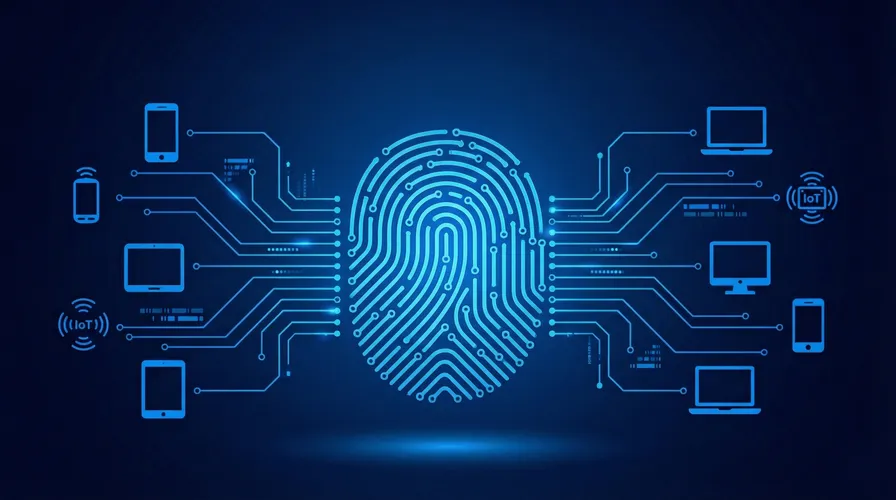
Every visitor to your website leaves a trail of technical details behind. Screen size, graphics card, installed fonts, timezone, audio drivers. Individually, none of these signals are unique. But combine 40 or more of them together, and you get something remarkably powerful: a stable identifier that can recognize a returning visitor without storing a single cookie on their device.
That is device fingerprinting. And if you run a business on the web, understanding how it works is no longer optional.
How device fingerprinting actually works
When someone loads your page, their browser quietly exposes dozens of configuration details through standard web APIs. A fingerprinting script collects these signals, sends them to a server, and produces a single hash: the visitor’s fingerprint.
Here is what makes this interesting. No single signal is enough. Millions of people share the same screen resolution or timezone. But the combination of signals narrows the pool dramatically. By the time you factor in GPU renderer, canvas rendering behavior, font list, audio stack, and a few dozen more attributes, you are looking at an identifier that is unique among millions of visitors.
The best systems go further. Instead of treating the fingerprint as a static snapshot, they track how it evolves. When a visitor updates their browser or installs a new font, a naive system would treat them as a brand new person. A smart system recognizes that only one signal changed and links the new fingerprint to the existing visitor profile.
What signals are collected?
Here are some of the most common ones:
- Canvas rendering - The browser draws a hidden image. Tiny differences in GPU, drivers, and rendering engine produce a unique output for each device.
- WebGL output - Similar to canvas, but with 3D graphics. Different GPUs execute WebGL instructions with subtle hardware-level variations.
- Installed fonts - The specific mix of system and custom fonts on a device is surprisingly unique.
- Audio processing - A digital oscillator generates a sound wave. The way the device’s audio stack processes it varies based on hardware and drivers.
- TLS handshake - The cryptographic algorithms and parameters a browser uses during the TLS handshake create a recognizable pattern, especially useful for spotting bots.
- Screen and hardware - Resolution, color depth, number of CPU cores, device memory, timezone, language settings.
- Browser behavior - Installed plugins, ad blocker presence, Do Not Track settings, supported media formats.
A lightweight script collects all of this in the background without affecting page load or user experience.
Why cookies are not enough
Cookies have been the default visitor identification tool for decades. You drop a unique ID into the browser on first visit, and you read it back on every return visit. Simple.
The problem is that cookies are trivially easy to defeat:
- Users clear them manually or through browser settings
- Incognito and private browsing modes block them entirely
- Safari’s Intelligent Tracking Prevention deletes them after 7 days (or 24 hours for some)
- Browser extensions and ad blockers strip them out
- Fraudsters delete them on purpose between attacks to appear as new visitors
Device fingerprinting solves this. Since the identifier is derived from the device itself rather than stored on it, clearing cookies, switching to incognito, or using a privacy extension does not reset the fingerprint. The device is still the same device.
This does not mean fingerprinting replaces cookies. They serve different purposes. Cookies are still the best tool for session management and storing user preferences. Fingerprinting fills the critical gap when cookies are unavailable or have been intentionally wiped.
Where fingerprinting makes the biggest impact
Fraud prevention
Most fraud starts with deception about identity. A bad actor creates ten accounts to abuse a promotion. A stolen credit card gets used from behind a VPN. A bot farm hammers your login page with credential stuffing attacks.
In all of these cases, the attacker is trying to look like someone (or something) they are not. Device fingerprinting cuts through the disguise. It does not matter if they clear cookies between sessions, rotate IP addresses, or switch browsers. If they are on the same device, you know.
Bot detection
Automated traffic looks different at the fingerprint level. Headless browsers like Puppeteer have distinct canvas and WebGL outputs. Selenium leaves traces in JavaScript APIs. Even sophisticated bots that spoof user agents often miss dozens of other signals that give them away.
The TLS handshake is particularly revealing here. HTTP libraries and headless browsers negotiate TLS differently than real browsers, and that pattern is nearly impossible to fake convincingly.
Account protection
When a trusted user logs in from their usual device, you can recognize the fingerprint and let them through without friction. When someone tries to access the same account from an unrecognized device, you can trigger step-up authentication: an SMS code, an email confirmation, or a security question.
This is risk-based authentication. Good users barely notice it. Bad actors hit a wall.
The privacy question
Any technology this powerful raises a fair question: is this ethical?
The honest answer is that it depends entirely on how you use it.
Fingerprinting for security (fraud detection, bot prevention, account protection) is widely considered legitimate. Both GDPR and CCPA recognize “legitimate interest” as a valid legal basis for processing data to protect the security of your product. You are not tracking people across the web. You are protecting your users and your business.
Fingerprinting for cross-site tracking (building ad profiles, surveillance without consent) is a different story. This is what privacy-focused browsers like Brave and Firefox actively fight against, and rightfully so.
The line is clear. If you are using fingerprinting to protect your product and your users, you are on solid ground. If you are using it to track people without their knowledge for advertising purposes, you are not.
For businesses using fingerprinting responsibly:
- Disclose your use of fingerprinting in your privacy policy
- Limit data collection to what is necessary for security
- Never use fingerprinting data for cross-site tracking or ad targeting
- Provide opt-out mechanisms for non-essential use cases
Getting started with Guardian
Guardian combines 70+ device and browser signals with server-side analysis and machine learning to generate visitor identifiers with 99.5%+ accuracy. The identifier stays stable across sessions, incognito mode, and browser updates.
Getting started takes minutes:
- Create a free account at dashboard.guardianstack.ai
- Add the JS agent to your site with a single script tag or npm package
- Start identifying visitors and use the API to power fraud rules, bot detection, and account protection
Start your free trial or talk to our team to see how Guardian can help protect your business.
Frequently asked questions
Is device fingerprinting legal?
How accurate is device fingerprinting?
Can device fingerprinting replace cookies?
Does device fingerprinting work in incognito mode?

Related articles
· 9 min read
Account Sharing in SaaS: The Security Risk Nobody Talks About
One in three employees admits to sharing passwords. Learn how account sharing in enterprise SaaS creates security blind spots and how to detect it.
· 10 min read
Device Trust Without MDM: How to Secure BYOD in 2026
95% of organizations allow BYOD, but employees refuse MDM on personal devices. Learn how device trust provides security without software installation.
· 10 min read
Unmanaged Devices: The 46% Blind Spot in Your Security
The 2025 Verizon DBIR found 46% of credential leaks come from unmanaged devices. Learn how device trust secures BYOD without MDM.